From CUDA Graph Crash to Tensor Core: Tracing a vLLM INT8 Bug
Tracing a vLLM CUDA graph capture crash on INT8 inference back to a hidden minimum batch-size constraint in PyTorch's torch._int_mm kernel.
01. Intro
While deploying an INT8-quantized LLM with vLLM on NVIDIA A100 GPU, I ran into this error during startup — pytorch/ao#2376:
1
RuntimeError: self.size(0) needs to be greater than 16, but got 16
vLLM captures CUDA graphs for a range of batch sizes — [1, 2, 4, 8, 16, 24, 32, …] — during model initialization. Every size from 1 to 16 failed with the same error. The vLLM engine failed to start. The culprit was torch._int_mm, PyTorch’s internal INT8 matrix multiplication kernel.
But why did it fail? Why does 16 matter so much — and why did hitting this limit take down the entire serving engine?
02. CUDA Graphs Turn a Soft Limit into a Hard Cliff
Without CUDA graphs, hitting this limit would just cause a runtime error for that specific call — recoverable at the application level. With CUDA graphs, the situation is much worse.
CUDA graphs work by pre-recording all GPU operations ahead of time, then replaying the recording for speed. vLLM uses this to reduce per-request overhead in production serving. Before capturing a graph, vLLM performs a warmup run for each target batch size. If torch._int_mm throws during warmup — as it does for M ≤ 16 — that batch size can never be successfully captured. Since vLLM warms up all batch sizes during initialization, every size from 1 to 16 fails, and the engine refuses to start entirely.
A single software constraint buried three layers deep in the stack — “CUTLASS kernel → PyTorch torch._int_mm → vLLM CUDA graph capture” — becomes a deployment blocker. It can be fixed by (1) padding the batch dimension to M = 17 before calling torch._int_mm when M ≤ 16, or (2) skipping CUDA graph capture for batch sizes M ≤ 16 in the vLLM engine.
So, why does torch._int_mm reject M ≤ 16 in the first place? The answer is in the hardware.
03. Background
A. What’s so hard about MatMuls?
In hardware, MatMul works like an accumulated inner product of outer products. It iterates through tiles to compute each element of the output matrix within 3 nested loops — but each output element requires reading a full row from A and a full column from B. At scale, memory bandwidth becomes the bottleneck, not raw compute.
As Figure 1 shows, this access pattern loads the same data repeatedly across iterations, burning memory bandwidth without increasing arithmetic throughput.
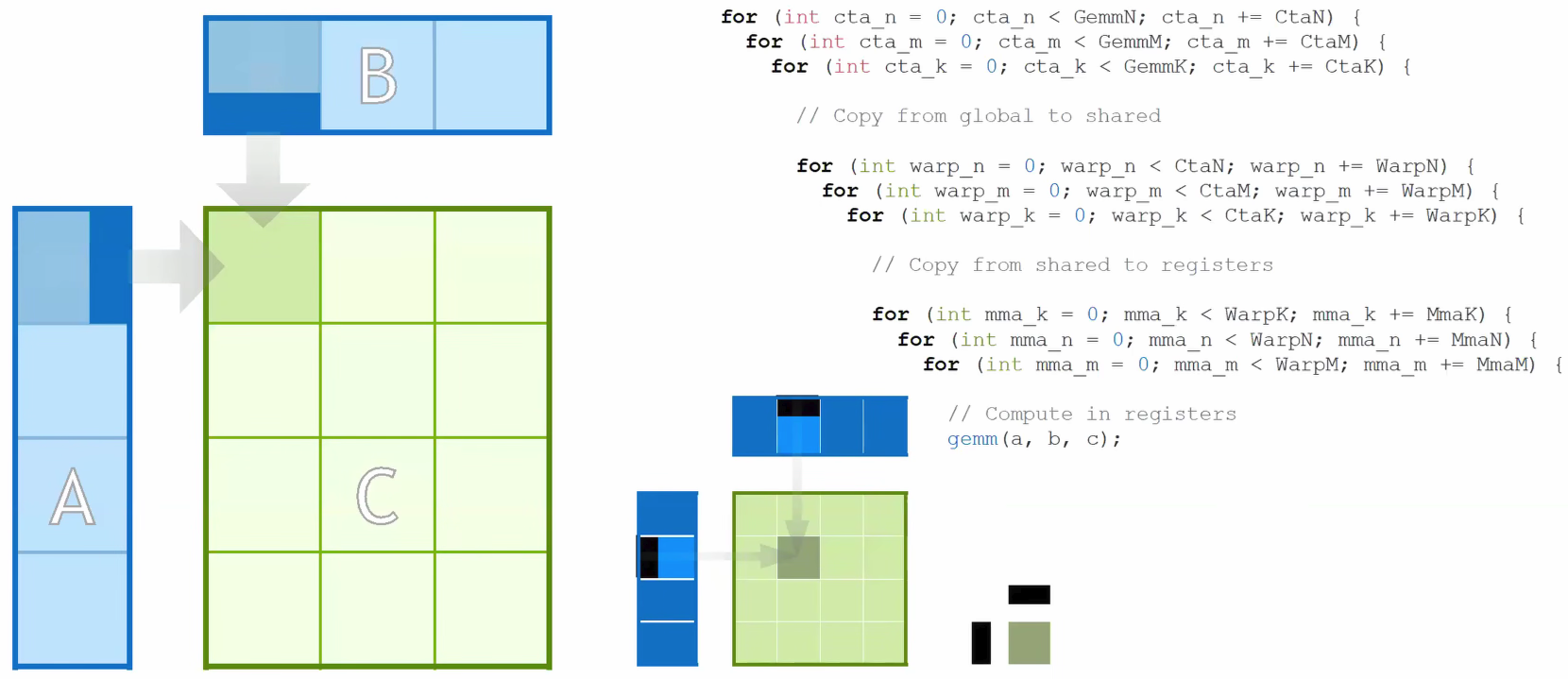
So the question becomes: how do we maximize arithmetic per memory access? By improving this ratio, we can compute more operations per byte loaded from memory — and improving it is exactly what Tensor Cores were built to do.
B. “Tensor Core”, modern MatMul accelerator
NVIDIA GPUs have two kinds of compute units: CUDA Cores and Tensor Cores.
CUDA Cores are general-purpose: each one executes one FMA (Fused Multiply-Add) per clock cycle — a single a × b + c. That’s O(N) work per instruction. Flexible, but limited: MatMul is an O(N³) operation, so doing it one scalar at a time wastes most of the GPU’s potential.
Tensor Cores solve this by moving the unit of work up from a scalar to a matrix tile. A single Tensor Core MMA (Matrix Multiply-Accumulate) instruction computes:
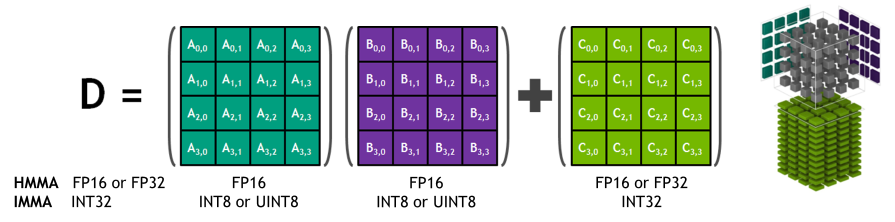
As shown in Figure 2, the formula is D = A × B + C, where A (M×K), B (K×N), C (M×N), D (M×N) are all small fixed-size matrix fragments — not scalars (column/row). One instruction, O(N³) useful work. The key is tile reuse: you load a tile of A and a tile of B into fast on-chip shared memory once, then compute all M×N×K multiply-adds from that single load. This directly solves the bandwidth bottleneck from §03A — O(N³) compute from O(N²) memory accesses.
The tile dimensions are not a software choice — they are etched into the silicon. The hardware multiplier array physically spans exactly M rows and N columns, and the MMA instruction only fires when given that exact shape. For example, on Ampere (A100), the INT8 MMA instruction is M=16, N=8, K=8.
These tile sizes have grown with each GPU generation as NVIDIA adds more Tensor Core hardware:
| GPU Generation | Example MMA Shape | Inner dim (K) |
|---|---|---|
| Ampere (SM80) | 16×8×8 | 8 |
| Hopper (SM90) | 64×16×16 | 16 |
| Blackwell (SM100) | 128×256×32 (1SM) | 32 |
Each generation doesn’t just add more cores — it widens the tile, doing more work per instruction and amortizing the memory load cost over even more compute.
04. Why M > 16, Not M ≥ 16?
A. Tensor Cores Work in Tiles, Not Individual Numbers
torch._int_mm is PyTorch’s accelerated INT8 MatMul kernel, used by libraries like torchao (ao) to speed up quantized linear layers. On modern NVIDIA GPUs, it relies on Tensor Cores for throughput.
As covered in §03B, on Ampere the INT8 MMA tile height is 16 rows. When M = 16, the input matrix fits perfectly within exactly one tile — so the hardware MMA instruction can physically execute this. Yet the kernel rejects it.
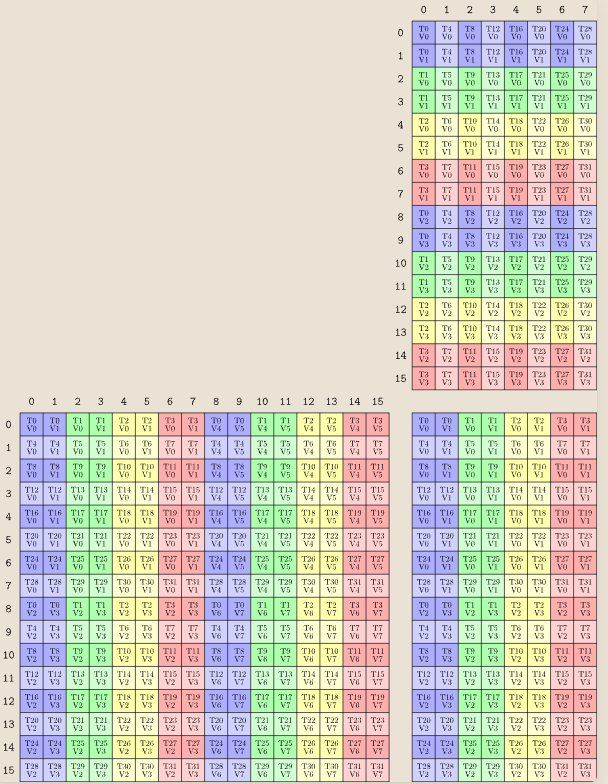
In Figure 3, each grid has exactly 16 rows (0–15) — that is the M=16 tile height of the SM80 MMA instruction.
B. NVIDIA’s CUTLASS Avoids Small Dimensions to Utilize Tensor Cores
The M > 16 check is a library-level constraint enforced by CUTLASS — the kernel library underlying PyTorch’s torch._int_mm.
The hardware MMA instruction tile height is exactly 16 rows — visible in CUTLASS’s own instruction naming convention as SM80_16x8x8 (Speaking Tensor Cores, NVIDIA 2024). So the hardware can physically execute M=16. The M > 16 check (strictly greater than, not ≥) comes from how CUTLASS structures its kernel loop.
CUTLASS kernel templates divide the main computation into three phases: a prologue that loads the first tile, a main loop that iterates over the remaining tiles, and an epilogue that writes results. This structure assumes the matrix is strictly taller than one tile — the loop is written to advance at least one tile stride past the starting position. When M == tile_height exactly, there are no remaining tiles for the main loop to process, and the prologue/epilogue handling hits an edge case the implementation does not account for. Starting from M = 17, there is always at least one row beyond the first tile, and the loop structure works as designed — which is why the fix in pytorch/ao#3558 simply pads the batch dimension to 17.
References
- GPU Mode Lecture 23: Tensor Cores: https://youtu.be/hQ9GPnV0-50
- NVIDIA CUDA docs: https://docs.nvidia.com/cuda/parallel-thread-execution/
- (Blog) NVIDIA Tensor Core TN Layout MMA Instruction: https://leimao.github.io/blog/NVIDIA-Tensor-Core-MMA-Instruction-TN-Layout/